05 / Laboratory and imagingIn pilot

Requests out. Signed results back.
A portal for laboratories and imaging centres. Doctors send lab and imaging requisitions electronically, and results are released straight into the patient's record as signed documents.
Talk to us about Labs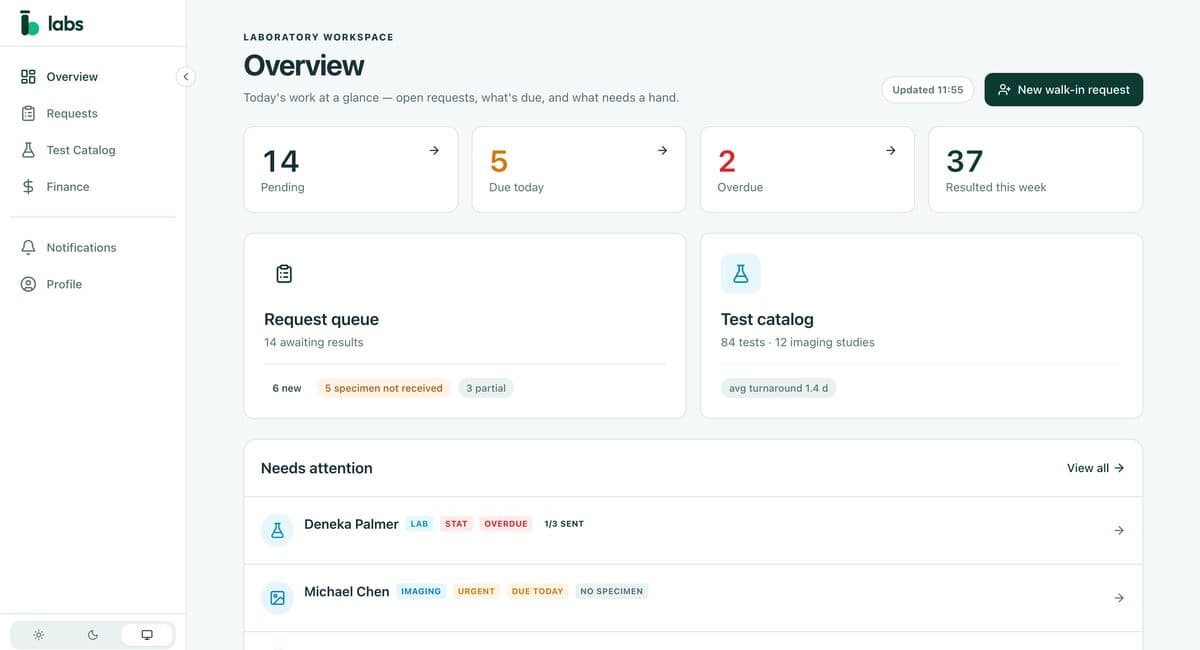
How it works with Doc4
One requisition, from the consultation room to the result.
- 01
Doc4
Requested
The doctor sends a lab or imaging requisition to a connected laboratory.
- 02
Labs
Received
It arrives in the lab's request queue, with the tests and the ordering doctor.
- 03
Labs
Resulted
Results are entered and released as signed diagnostic documents.
- 04
Doc4
Back in the record
The doctor is notified, with a separate alert for critical results.
What's included
The lab's whole day, connected to the practices it serves.
For the laboratory
- 01
Request queue
Pending, due today and overdue, at a glance.
- 02
Test catalogue
Lab tests and imaging studies, at the lab's own prices.
- 03
Result entry and release
Results go out as signed documents in the practice's format.
- 04
Finance
Invoices, bills, vendors, purchase orders, bank accounts, tax and reports.
For the practice and the patient
- 01
No printed requisitions
Requests go straight from the chart to the lab.
- 02
Results in the record
Released into the patient's record, ready to read.
- 03
Critical results flagged
The ordering doctor gets a separate alert.
- 04
Patients see their results
Visible in NearCare once the doctor releases them.
Contact
Connect your lab to the practices you serve.
We're onboarding partner laboratories now. Tell us about yours and we'll walk you through it.